RambleFix vs. AudioPen: Which Voice-to-Text Tool Fits How You Work? (2026)
AudioPen vs. RambleFix: pricing, recording limits, and platform coverage compared, with sources, to help you pick.
Yash Bagal, Founder, RambleFix··14 min read
By the RambleFix Team — we build RambleFix and write about voice-to-text tools, including competitors, based on public documentation and our own product's verified specs.
TL;DR: AudioPen turns short voice notes into styled text through a cloud-only "rewrite" mode, plus a separate offline "Voice Typing" mode for raw dictation. RambleFix does the polishing pass system-wide, in any app on your Mac, without splitting the two. If you dictate long-form work, client updates, blog drafts, meeting recaps, across multiple apps, that split matters. Choose AudioPen if you want quick, one-time-payment note capture. Choose RambleFix if you want one continuous, system-wide dictation workflow with room for longer recordings.
AudioPen built a genuinely useful tool for a specific job: capture a rambling voice note and get back something readable in a style you pick. But dig into its own FAQ and you'll find an architecture most comparison articles miss. There's a cloud "rewrite" mode that handles the styling, and a completely separate offline "Voice Typing" mode that just transcribes raw text. If you've hit AudioPen's 15-minute recording cap, wondered whether it works without wifi, or wanted the same polish inside every app instead of just its own note capture screen, you've bumped into that split without knowing it existed.
This piece compares AudioPen and RambleFix on the specifics: pricing structure, per-recording time limits, platform coverage, and what each tool actually does with the words you speak. No trash talk, just the numbers and the trade-offs.
Key Takeaways
- AudioPen splits its product into two modes: a cloud "rewrite" mode (styled output) and a separate offline "Voice Typing" mode (raw transcription). RambleFix applies one rewrite/cleanup pass everywhere, system-wide on Mac.
- AudioPen sells one-time Prime access ($33 for 3 months, $99 for 1 year, $159 for 2 years). RambleFix runs subscriptions starting at $5/month, with a free tier at 1,000 words/month.
- AudioPen caps recordings at 15 minutes per note on Prime. RambleFix's per-recording caps scale from 20 minutes (Personal) to 4 hours (Pro).
- AudioPen covers more raw platforms (8, including Android, iPad, Watch, and a Chrome extension). RambleFix's strength is depth on Mac: true system-wide dictation into any text field, not just its own app.
- AudioPen is purpose-built for short voice notes and idea capture. RambleFix is built for longer, polished output produced across multiple apps in one sitting.
What AudioPen Actually Does
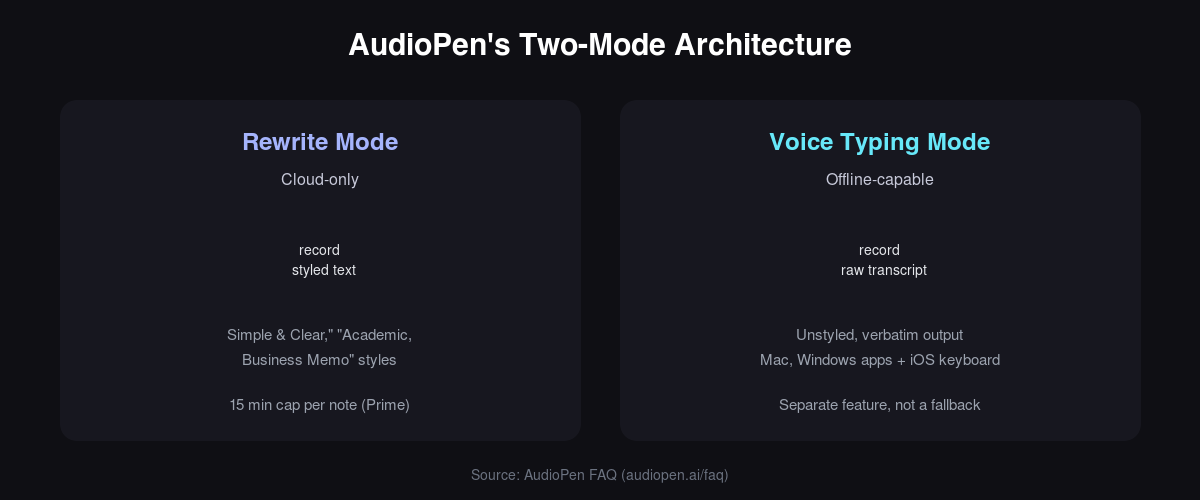
AudioPen is a voice-notes tool with two distinct modes, not one unified experience. Its main, marketed feature is a cloud "rewrite" mode: you record a note, and AudioPen restyles it into "Simple & Clear," "Academic," "Business Memo," or a custom style you define, with an adjustable intensity slider. That's the product most people mean when they say "AudioPen."
Separately, AudioPen ships an offline "Voice Typing" mode built into its Mac and Windows apps and its iOS keyboard. This mode produces raw, unstyled transcription and, per AudioPen's own FAQ, can run without an internet connection. It's a genuinely different feature from the rewrite mode, not a fallback version of it, and conflating the two is where a lot of comparison content goes wrong.
Beyond those two modes, AudioPen offers multi-language input and output, "SuperSummaries" that combine multiple notes into one, audio file upload for pre-recorded voice memos, and an Apple Watch companion app. It's available on web, Mac, Windows, iOS, iPad, Android, and as a Chrome extension, all under one account. AudioPen's own site frames its use cases plainly: writers overcoming blank-page syndrome, creators capturing fleeting ideas, and sales professionals doing post-meeting debriefs. It is not marketed as a meeting-transcription tool, and it doesn't do speaker diarization or automatic action-item extraction.
What RambleFix Does Differently
RambleFix applies the same rewrite and cleanup pass system-wide, in any app on your Mac, plus the web, with no separate "raw" mode to reconcile. Speak into a Slack message, an email, a Google Doc, or a client proposal, and the same polishing pass runs every time, in the same place you're already typing. There's no dedicated "notes" screen to visit first.
RambleFix's tagline is direct about the goal: "Speak. We'll write." The product turns a rambling recording into a polished email, note, or post, cleaning up filler words and false starts automatically, matching your writing tone, and generating one-click summaries or action-item lists from the same recording. RambleFix's own marketing claims this workflow runs about 4x faster than typing the same output by hand, a stated claim from RambleFix, not an independently measured figure, so treat it as the company's own benchmark rather than third-party data.
That system-wide behavior is the practical difference from AudioPen's architecture. You're not choosing between a styled cloud pass and a raw offline pass depending on which app you're in. You get one dictation hotkey that works the same way everywhere on your Mac.
For the full walkthrough, see our system-wide Mac dictation guide.
Quick Comparison
| Category | AudioPen | RambleFix |
|---|---|---|
| Best for | Short voice notes, idea capture, sales debriefs | Long-form dictation across multiple apps |
| Pricing model | One-time payment (Prime) | Subscription, monthly or yearly |
| Free tier | ~10 notes, short recording cap (unverified exact limit) | 1,000 words/month, no credit card |
| Cheapest paid tier | $33 for 3 months (~$11/mo) | $5/month ($60/year) |
| Per-recording limit (paid) | 15 minutes | 20 min to 4 hours, by tier |
| Dictation model | Two modes: cloud rewrite + offline raw typing | One unified pass, system-wide |
| Meeting/action-item extraction | Not offered | Yes, summaries and action items |
| Platform count (raw) | 8: web, Mac, Windows, iOS, iPad, Android, Watch, Chrome | 2 confirmed: Mac (system-wide), web |
| Offline mode | Yes, via separate Voice Typing mode | Not applicable (cloud rewrite pass) |
| Audio data handling | Deleted "soon after" processing, not used for AI training (FAQ) | Deleted right after transcription, never used for training, never sold |
Recording Limits and Long-Form Work
RambleFix wins on recording length for long-form dictators, because its caps scale from 20 minutes to 4 hours per recording, well past AudioPen's flat 15-minute ceiling on paid tiers. AudioPen's rewrite mode tops out at 15 minutes per note even on its paid Prime plans, a limit that's fine for a quick voice memo but tight for a 30-minute client debrief or a long first draft. RambleFix's Personal tier already matches AudioPen's ceiling at 20 minutes, and the Plus and Pro tiers extend that to 90 minutes and 4 hours, respectively.
This matters because of a basic mechanical fact: speech is roughly three times faster than typing. Stanford's HCI Group measured English speech input at about three times the words-per-minute rate of typing, with a 20.4% lower error rate, using both professional and consumer dictation systems (Ruan et al., "Speech Is 3x Faster than Typing for English and Mandarin Text Entry on Mobile Devices," Stanford HCI Group, 2016). That speed advantage is exactly why a hard recording cap starts to hurt once you're dictating anything longer than a quick note. A 45-minute strategy memo hits AudioPen's ceiling three times over.
Here's where the limit actually lands, per tool and tier:
| Tool / Tier | Per-recording cap |
|---|---|
| AudioPen (Prime, paid) | 15 minutes |
| RambleFix Personal ($5/mo) | 20 minutes |
| RambleFix Plus ($10/mo) | 90 minutes |
| RambleFix Pro ($20/mo) | 4 hours |
Verdict: RambleFix wins for anyone dictating past the 15-minute mark, but AudioPen's cap is a non-issue if your notes are genuinely short. A two-minute idea dump or a quick debrief doesn't care about a 15-minute ceiling either way.
Platform Coverage: Where Each Tool Works
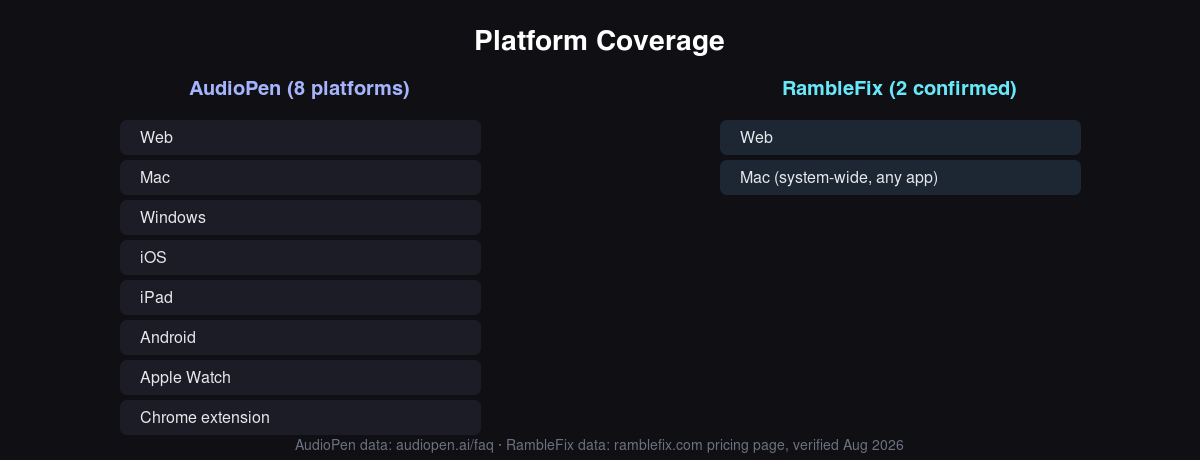
AudioPen wins on raw platform count, covering web, Mac, Windows, iOS, iPad, Android, Apple Watch, and a Chrome extension, all under one account. That's real breadth, and it matters if you want the same note-capture app on your phone, your tablet, and your wrist. RambleFix currently confirms support for Mac and web, a narrower list.
The difference that matters in daily use is depth versus breadth. AudioPen's platforms each open its own app or extension, you record inside AudioPen, then the styled text lives inside AudioPen's note list until you copy it elsewhere. RambleFix's Mac support works system-wide: a hotkey dictates directly into whatever app has focus, Slack, Mail, a Google Doc, a terminal, without a copy-paste step. That's a different kind of coverage, less about how many devices you can install on and more about how many apps you can dictate into without leaving them.
Bottom line: pick AudioPen for breadth (one app across phone, tablet, and watch), pick RambleFix for depth (a Mac workflow that skips the copy-paste step entirely).
Pricing Compared
For a typical heavy user, AudioPen's one-year Prime plan costs $99 as a single one-time payment. RambleFix's comparable Plus tier costs $120 per year, billed annually and auto-renewing. AudioPen's structure is a genuine advantage for anyone who wants to pay once and be done: $33 for 3 months (about $11/month), $99 for 1 year (about $8.25/month), or $159 for 2 years (about $6.63/month). None of those renew automatically. RambleFix runs on recurring subscriptions instead, monthly or yearly: $5/month (Personal, $60/year), $10/month (Plus, $120/year, marked "Most popular"), or $20/month (Pro, $240/year).
Both tools offer a genuinely free tier. AudioPen's free plan reportedly allows around 10 notes with a short recording cap, though the exact free-tier limit isn't clearly published and should be confirmed on AudioPen's own site before you rely on it. RambleFix's free tier gives 1,000 words per month with no credit card required, on Mac and web.
The scaling math depends on how long you plan to keep paying. AudioPen's 2-year Prime plan works out cheaper per month ($6.63) than any RambleFix tier, as long as you don't need it past that window and don't need higher recording caps or action-item extraction. RambleFix costs more over a multi-year horizon at the entry tier, but it scales with usage: heavier users move up to Plus or Pro for longer recordings, without ever hitting AudioPen's flat 15-minute ceiling.
| Tier | AudioPen | RambleFix |
|---|---|---|
| Free | $0, ~10 notes, short cap (unverified) | $0, 1,000 words/month, no card required |
| Entry paid | $33 for 3 months (one-time, ~$11/mo) | $5/month ($60/year) |
| Mid | $99 for 1 year (one-time, ~$8.25/mo) | $10/month ($120/year), "Most popular" |
| Top | $159 for 2 years (one-time, ~$6.63/mo) | $20/month ($240/year) |
On cost alone, AudioPen's multi-year one-time plan is hard to beat, provided you stay under its recording cap. On scaling value for heavier, longer-form dictation, RambleFix pulls ahead, since its subscription unlocks higher per-recording limits at every paid tier.
See current RambleFix pricing for the latest tiers.
Who Each Tool Is Actually For
AudioPen fits people capturing short, discrete voice notes and ideas; RambleFix fits people producing longer written output, emails, client updates, articles, across multiple apps in one sitting. AudioPen's own site names its core users directly: writers overcoming blank-page syndrome, creators capturing fleeting ideas before they slip away, and salespeople doing quick post-meeting debriefs. Those are all short, bursty use cases, and AudioPen is built well for them.
RambleFix's audience skews toward people who write a lot for a living and think faster than they can type: consultants, founders, journalists, lawyers, and product people producing longer documents across several apps in a single work session. That audience also includes people with ADHD or dyslexia who find voice-first capture easier than staring at a blank page. That's not a niche concern. An estimated 6.0% of U.S. adults, roughly 15.5 million people, have a current ADHD diagnosis, according to the CDC's most recent national data (Staley et al., NCHS Data Brief No. 543, published December 2025). For a meaningful share of any professional audience, talking through a draft is genuinely easier than typing one from a blank page, independent of which tool they end up using.
There's no universal winner here: the two tools are built for different jobs. AudioPen handles quick capture and idea-shaping; RambleFix handles longer, polished output produced on the fly across your existing apps.
Making the Switch
Switching is low-risk to trial if the two-mode split or the 15-minute cap is your specific friction point, since RambleFix's free tier needs no credit card. You'd lose AudioPen's broader device list (no Android, iPad, or Watch app) and its one-time-payment option. You'd gain one system-wide Mac dictation workflow, higher per-recording caps, and built-in summaries and action items from the same recording.
Verdict: the switch costs little to try, but it only makes sense if you've actually run into AudioPen's cap, its two-mode split, or want action items it doesn't offer.
Who Should Choose What
If you capture quick ideas, sales debriefs, or short voice memos across your phone, tablet, and watch, choose AudioPen. Its rewrite mode is built precisely for that job, and the one-time payment avoids a subscription for something you might use lightly.
Long-form writers and consultants: choose RambleFix. If you're dictating client updates, articles, or proposals that run past 15 minutes, RambleFix's higher recording caps and system-wide Mac dictation remove the ceiling AudioPen imposes.
Meeting-heavy professionals who need action items: choose RambleFix. Its summary and action-item extraction from a single recording covers a job AudioPen doesn't attempt.
Budget-conscious, infrequent users: choose AudioPen's one-time Prime plan. Paying once beats an ongoing subscription if your usage is light and steady.
If neither fits: if you need meeting transcription with speaker diarization, look at a dedicated meeting-transcription tool, neither AudioPen nor RambleFix is built for that job.
Frequently Asked Questions
Is AudioPen free?
Yes. AudioPen offers a free tier with a capped note count, reportedly around 10 notes, and a short per-recording length that isn't clearly published on AudioPen's site, so treat that exact figure as approximate. Paid Prime tiers remove the note-count cap and raise the recording length to 15 minutes per note, priced at $33 for 3 months, $99 for 1 year, or $159 for 2 years, all one-time payments (audiopen.ai, verified August 2026).
What is the AudioPen recording time limit?
On paid Prime tiers, AudioPen caps each note at 15 minutes. The exact free-tier cap isn't clearly published and should be confirmed directly on AudioPen's site before you rely on it for planning.
Does AudioPen work offline?
Its main rewrite mode, the one that produces styled output, is cloud-only. A separate "Voice Typing" mode, built into the Mac and Windows apps and the iOS keyboard, can run offline and produces raw, unstyled transcription instead of styled text. This is documented in AudioPen's own FAQ, and it corrects a claim in some competitor content that AudioPen has no offline functionality at all.
What's the difference between AudioPen and Otter.ai?
Otter.ai is built for meeting transcription, with speaker diarization and live meeting capture, a different category from AudioPen's personal voice-notes focus. This comparison focuses on AudioPen and RambleFix specifically; a fuller Otter comparison is worth its own separate piece.
Is there a system-wide dictation app like AudioPen for Mac?
Yes. RambleFix dictates system-wide into any Mac text field via a hotkey, applying the same rewrite and cleanup pass everywhere rather than only inside its own note-capture screen, which is how AudioPen's rewrite mode works.
Verdict: Category Winners
| Category | Winner |
|---|---|
| Recording length / long-form capacity | RambleFix |
| Platform breadth (raw device count) | AudioPen |
| System-wide dictation depth (Mac) | RambleFix |
| Pricing structure for infrequent users | AudioPen |
| Pricing value for heavy, long-term users | RambleFix |
| Meeting summaries / action items | RambleFix |
| Overall | RambleFix, for long-form, system-wide dictation. AudioPen remains the better fit for quick note capture and one-time-payment buyers. |
Both tools do what they're built for well. AudioPen is a solid, purpose-built voice-notes app if your work is short bursts of capture across a lot of devices. RambleFix is built for the opposite problem: longer written output, produced system-wide, without a copy-paste step or a recording cap that gets in the way.
If the recording cap or the two-mode split is your specific pain point, try RambleFix free, no credit card required to start.